SquareBooks. Your books, your GST and your CA, in one place.
SquareBooks connects chartered accountants with the businesses they look after. CA firms get a web workspace for every client’s filings, notices and documents. Business owners get a simple mobile app to record sales and bills, track stock and dues, and see exactly what their CA needs from them.
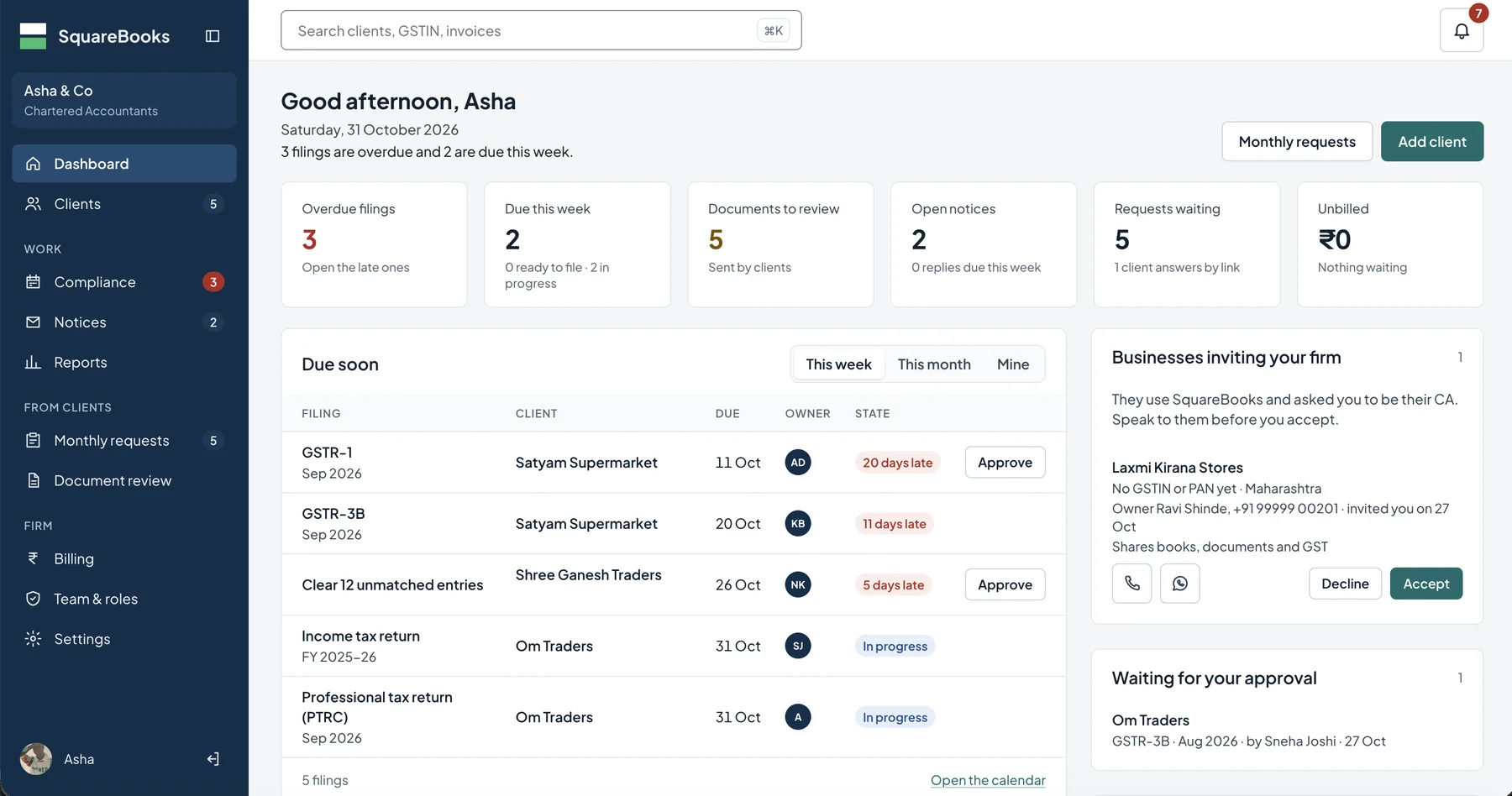
The CA firm dashboard. Screens throughout this page use demonstration data.
01 / THE PROBLEM WE SET OUT TO SOLVE
Two sides of the same books, finally working together.
For a small business, accounting usually means a pile of paper bills, sales scattered across a billing machine, UPI apps and a notebook, and a monthly round of WhatsApp messages from the accountant asking for the same documents again. For a CA firm, it means tracking dozens of clients, each with its own GST, TDS and ROC deadlines, while waiting on those clients to send what is needed.
SquareBooks puts both sides on one shared set of records. The business records its day-to-day activity once, in its own app. The CA firm sees that activity, along with every deadline and open request, in its workspace. Status flows back the other way, so the business owner always knows what has been filed, what is due and what the CA is waiting for.
01
The business records
Sales, purchase bills, customers and stock are captured as they happen: a sale by scan or tap, a bill by photo.
02
The CA firm works
The firm sees every client’s deadlines, documents and notices in one place, and splits the work across its team.
03
Both stay in step
Challans, document requests and notice updates go back to the business owner’s phone with a clear next step.
02 / FOR CA FIRMS · WEB APP
Run your whole practice from one workspace.
The SquareBooks web app is built around the questions a partner asks every morning: what is late, what is due this week, what is waiting on a client, and what is waiting on me. The dashboard answers them at a glance, and every figure opens the list behind it.
A dashboard that starts with what is late
Overdue filings, filings due this week, documents sent by clients, open notices, requests waiting and unbilled work sit at the top. Below, a due-soon list shows each filing with its client, due date, owner and state, with approvals one click away.
Clients who invite you
Businesses already using SquareBooks can invite your firm to be their CA. You see who they are, what they want to share (books, documents and GST) and how to reach them before you accept.
Compliance calendar and board
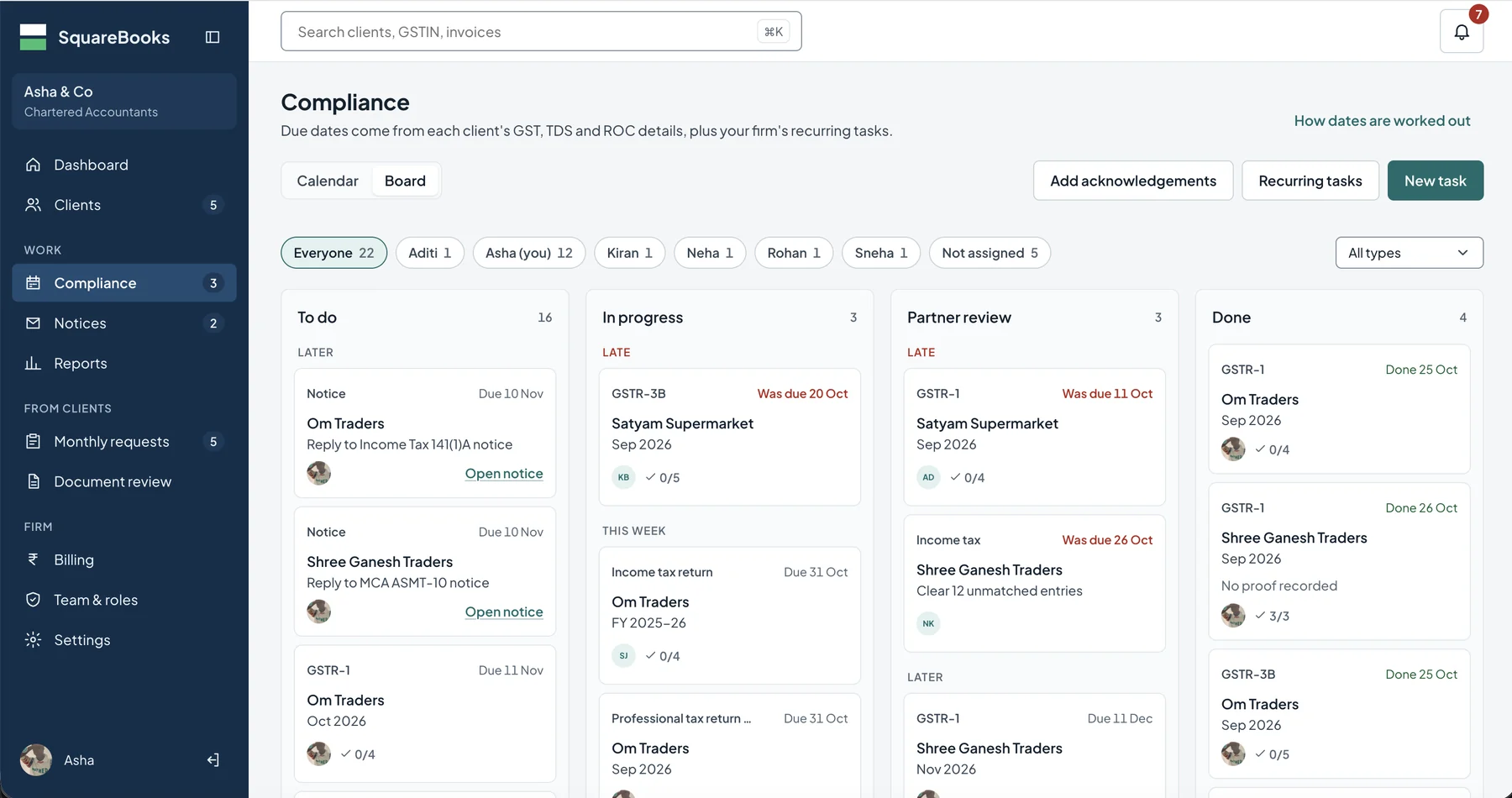
Due dates come from each client’s GST, TDS and ROC details, plus the recurring tasks your firm sets up. View them on a monthly calendar, or move work across a board from To do to In progress, Partner review and Done. Filter by team member to see who is carrying what, and record acknowledgements once a return is filed.
The compliance board, filtered for everyone in the firm. Late work rises to the top of each column.
Notices, tracked to the reply
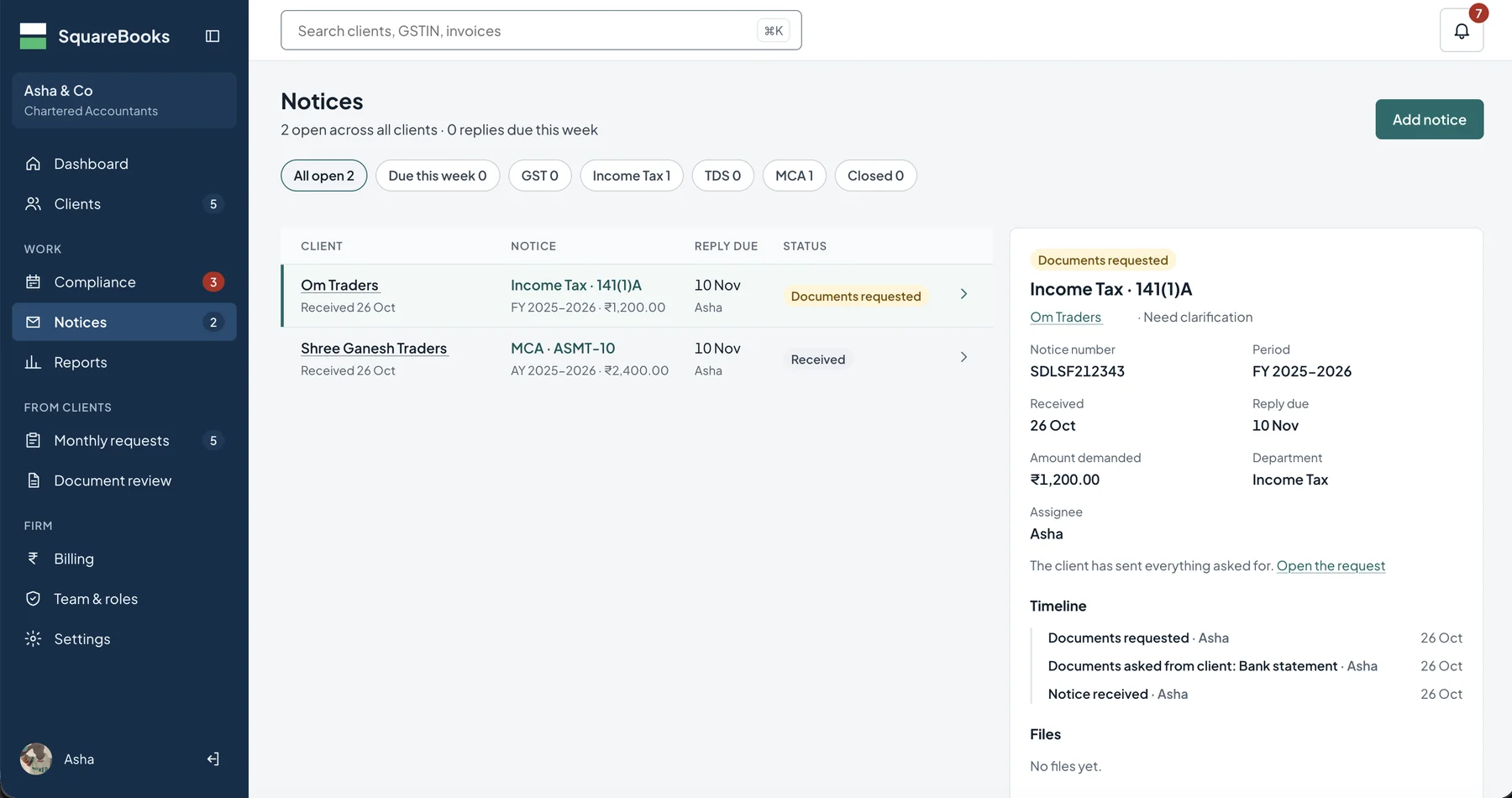
Log Income Tax, GST, TDS and MCA notices against the right client, with notice number, period, amount demanded, reply due date and assignee. Ask the client for supporting documents from the notice itself, and keep a timeline of everything that happened until it is closed.
An open notice with its details, document request and timeline.
Monthly requests
Ask every client for the month’s documents in one go. Clients without the app can answer through a link.
Document review
Review what clients send before it goes into the books, so nothing reaches a return unchecked.
Reports
Firm-wide views of compliance status, filings due and overdue, open notices, pending documents and work by staff, plus each client’s statements, registers, GST working, ageing and stock, downloadable as PDF or Excel.
Team, roles and billing
Give each person the right access, assign filings and notices to owners, keep partner review as a step, and see what work is still unbilled.
03 / FOR BUSINESSES · MOBILE APP
The shop runs on the phone. So do the books.
Most of the businesses CA firms serve are shops, traders and distributors whose owners are on their feet all day. The SquareBooks app is designed for them: large, clear actions, figures in rupees, and no accounting vocabulary needed to get through the day.
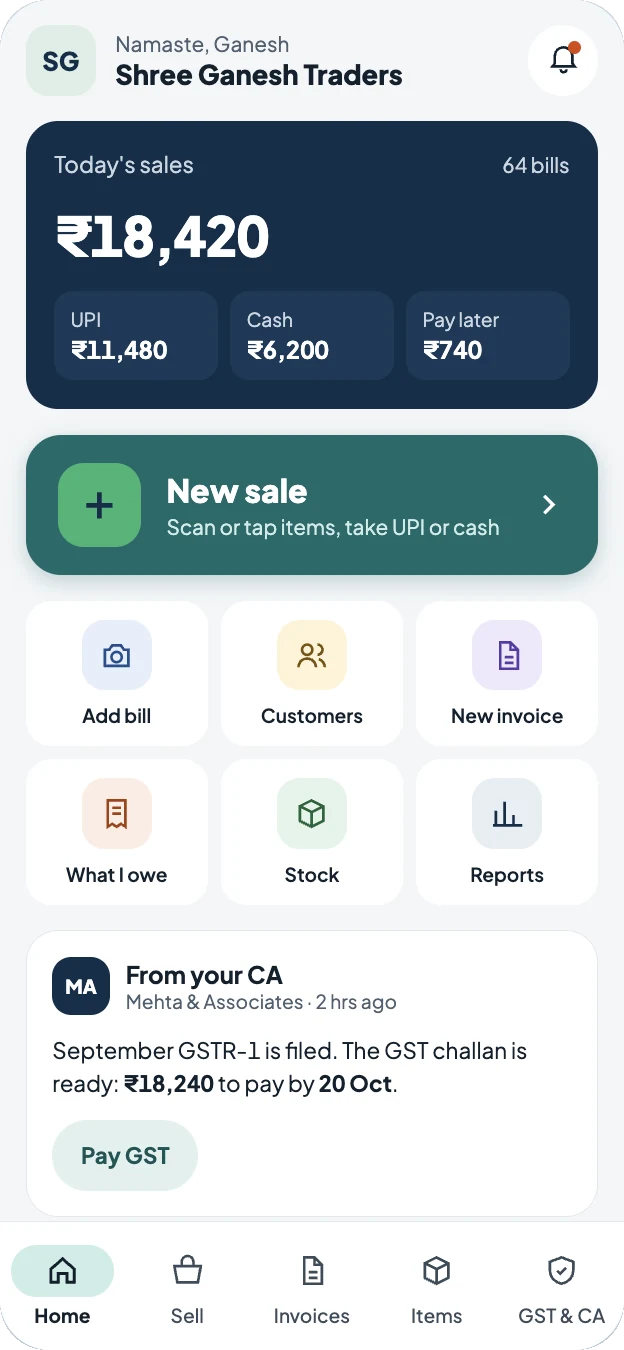
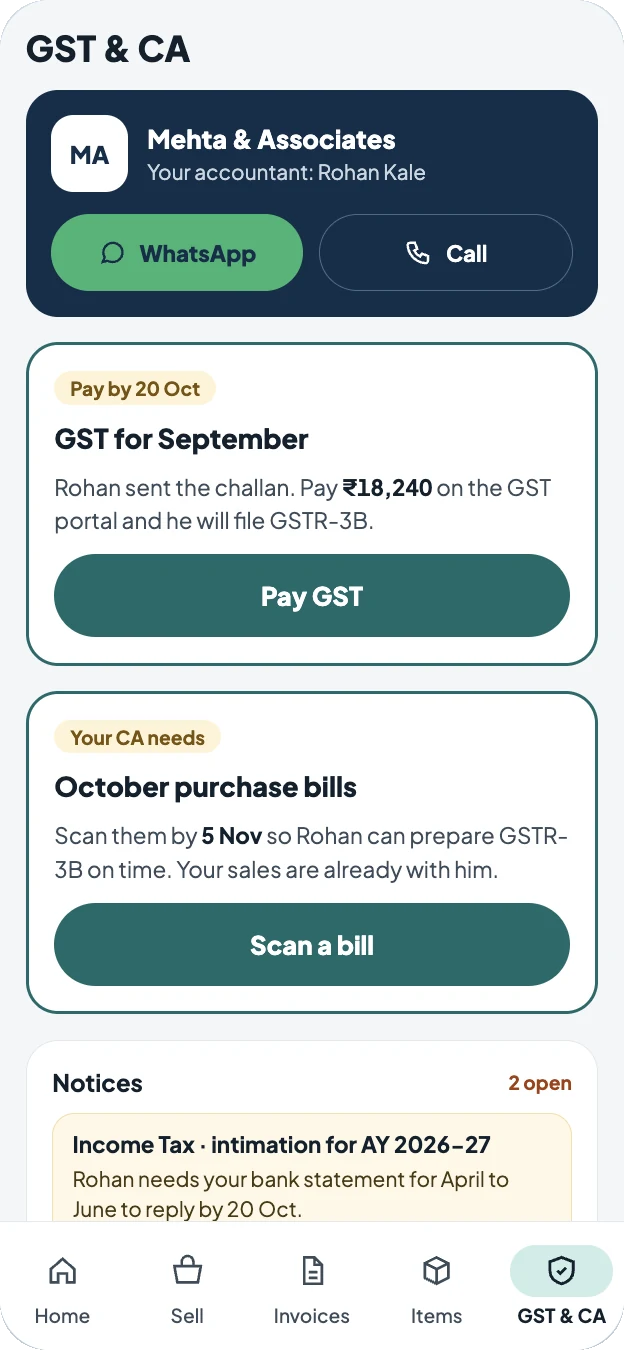
Home: today’s sales and a message from the CA.GST & CA: what to pay, what to send and open notices.
Sell and bill in seconds
Start a new sale by scanning or tapping items, and take payment by UPI, cash or pay later. Today’s total and the split between payment types are always on the home screen. Create invoices, manage customers and keep stock up to date from the same app.
Know where the business stands
See profit and loss, sales, dues and GST by month or year, including where expenses went and how monthly sales are trending. “What I owe” keeps supplier dues in view.
Your CA, one tap away
The GST & CA tab names your accountant and lets you reach them on WhatsApp or by phone. When a GST challan is ready, it shows the amount and due date. When your CA needs October’s purchase bills, it says so, with a button to scan them.
No surprises on notices
If a notice arrives, the app explains in plain words what it is, what your CA needs from you and by when, so the reply goes out on time.
QUESTIONS
Common questions about SquareBooks.
Who is SquareBooks for?
Chartered accountant firms that handle GST, income tax, TDS and ROC work for many small and medium businesses, and the business owners they serve. The firm uses the web app and its clients use the mobile app.
Does a business need its own CA to use SquareBooks?
A business can use the app for sales, invoices, stock and reports on its own. When it is ready, it can invite its CA firm from the app and choose what to share, such as books, documents and GST.
How are compliance due dates worked out?
From each client’s GST, TDS and ROC details, together with any recurring tasks the firm adds. The calendar and board update as work moves from to do to done.
Can a firm split work across its team?
Yes. Each filing and notice has an owner, the board can be filtered by person, and partner review is a separate stage before work is marked done.
What if a client doesn’t want to install an app?
Monthly document requests can be answered through a link, so the firm can still collect what it needs.
Who builds SquareBooks?
SquareBooks is designed and built by Mobitoss Technologies LLP in Pune, India. It is our own product, and much of what we have learned about building business software, from shaping a workflow to keeping data clear, goes into it.
GET STARTED
See SquareBooks for your firm or your business.
Pricing, sign-up and the latest features are on the SquareBooks website. For partnerships or a walkthrough for your firm, write to us.